
After an initial High School Speech Adjudicator workshop, these are steps to follow for grading assessments, and completing certification of participants.
There are two places participants may submit their assessment: through SpeechWire (preferred) or through our website (backup).
Check Payment Status #
Please check payment status for participants before completing the steps below, as this will trigger completion of their certification.
Access Assessments #
Log into Course “Contest” on SpeechWire #
- Log in to the contest on SpeechWire
- Click on the icon, Balloting status
- Click any link for “Storytelling, Round 1, Section A“
- Scroll down to the table under “Speaking order”
- Click on the “1 (Score)” link under a particular adjudicator’s name to open their evaluation in a new tab.
Log into WISDAA Wordpress #
- Under “Forms,” select Adjudicator HS Speech Certification: Alternative Assessment
- View Entries
- Select a particular adjudicator’s name to open their evaluation.
Grade Assessments #
Use the established 90-point rubric to determine how well their scores and comments meet our expectations, and document feedback for the participant on your grading.
Share Feedback #
- In the WISDAA Wordpress backend, in the left-hand sidebar, under “Assessment Feedback,” select “Add New Assessment Feedback“
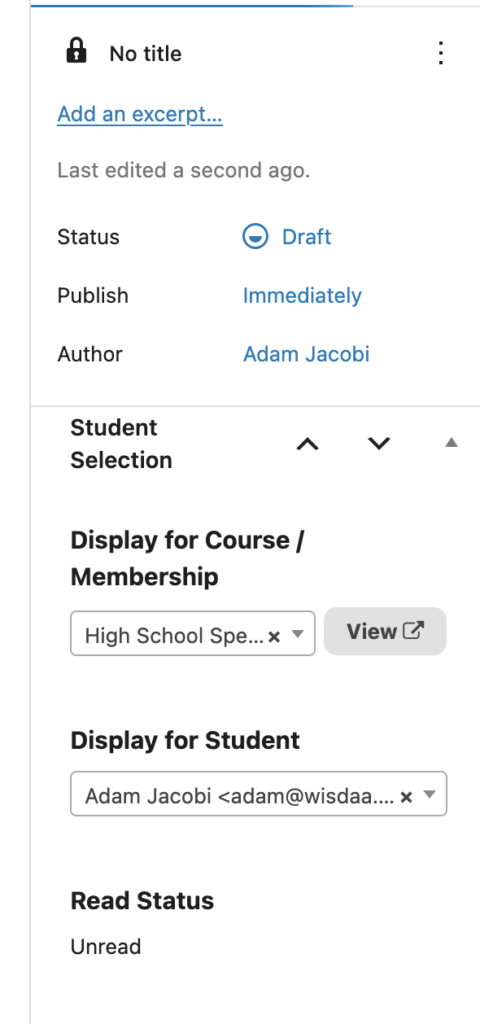
- On the next screen, in the right-hand sidebar:
- Under “Display for Course/Membership,” start typing “Initial” until the High School Speech Adjudicator Initial Certification course pops up, and select it.
- Under “Display for Student,” start typing part of the participant’s name, and select from the list that pops up (double-checking emails for common names).
- In the main area, for title, type/paste “Assessment Feedback
- In the area below, first type “Score: ” and then enter a value next to it up to 90 points.
- Below that, type/paste your comments about their assessment.
Issue Certificate #
- In the WISDAA Wordpress backend, in the left-hand sidebar, under “Engagements,” select Awarded Certificates.
- On the top, click the button, [Award New Certificate].
- Select the participant’s name in a similar manner as you did for their feedback above; if there are multiples of a common name, use email address to search.
- Under “Template,” type “Initial” and select HS Speech Initial Adjudicator (ID# 28716).
- Click the button, [Create Draft]
- You will see a draft of the participant’s actual certificate. In the upper right-hand corner, click the button, [Publish] and then confirm [Publish]. You will then see a button in the right-hand sidebar to [Award New Certificate] and you may repeat as necessary.
Update Google Sheet #
Update the Adjudicator Certification Status Google Sheet, accordingly.
Update SpeechWire Certification Database #
Update the SpeechWire certification database as you always have
Send Email Confirmation to Participant #
Send your post-grading email, using templates you have created in the past
Failure Workflow #
Use the “failure” email template to request enrollment in the retake course to take the quiz again.


